

When choosing a tool for running ABM campaigns on Linkedin, many folks compare ZenABM vs Fibbler. They have a similar (affordable!) price point, both share the core functionality of deanonymizing LinkedIn ad engagements on company level, and pushing them to your CRM. But they also have different features and were built for a different purpose.
I know because I’ve used both for my LinkedIn ABM campaigns (I’ve been running a 7-figure ABM program with LinkedIn ads – read my blog post about it here or the Case Study on it published on Kyle Poyar’s Growth Unhinged to find out how I manage it btw!) – in fact, I’ve used them both at the same time (ZenABM for data & revenue attribution, Fibbler for impression capping). Let’s see how they compare in a nutshell so you can make an informed decision whether ZenABM of Fibbler are better for running ABM campaigns on LinkedIn.


For those of you who want a quick overview – here’s Fibbler vs ZenABM comparison for LinkedIn ABM in bullet points:
Want more details? See how ZenABM vs Fibbler compare in this this quick feature-by-feature overview (even more details below).
Before I give you a drill down on the differences between ZenABM and Fibbler for each use case, here’s a quick overview:
| Criteria | ZenABM | Fibbler |
|---|---|---|
| ABM Use Case Functionality |
|
|
| Company Insights |
|
|
| Campaign Insights |
|
|
| Analytics (Dashboards) + Revenue attribution + AI analytics |
|
|
| LinkedIn Ad Campaign Management |
|
|
| Usability |
|
|
| Data Quality & CRM Company Match Rate | Higher data capture (e.g. 26% more clicks in 7-day windows), better match rate via multi-factor matching. | Lower data volume and match rate (~40%), due to reliance on exact domain matches. |
In a nutshell – ZenABM has been designed with running ABM campaigns on LinkedIn in mind, while Fibbler – for collecting LinkedIn ads insights.
ZenABM supports grouping your LinkedIn campaigns into ABM campaigns (a separate campaignign object), which allows it to offer a lot more granular analytics and accurate revenue attribution for both all your campaigns – and each ABM campaign separately:
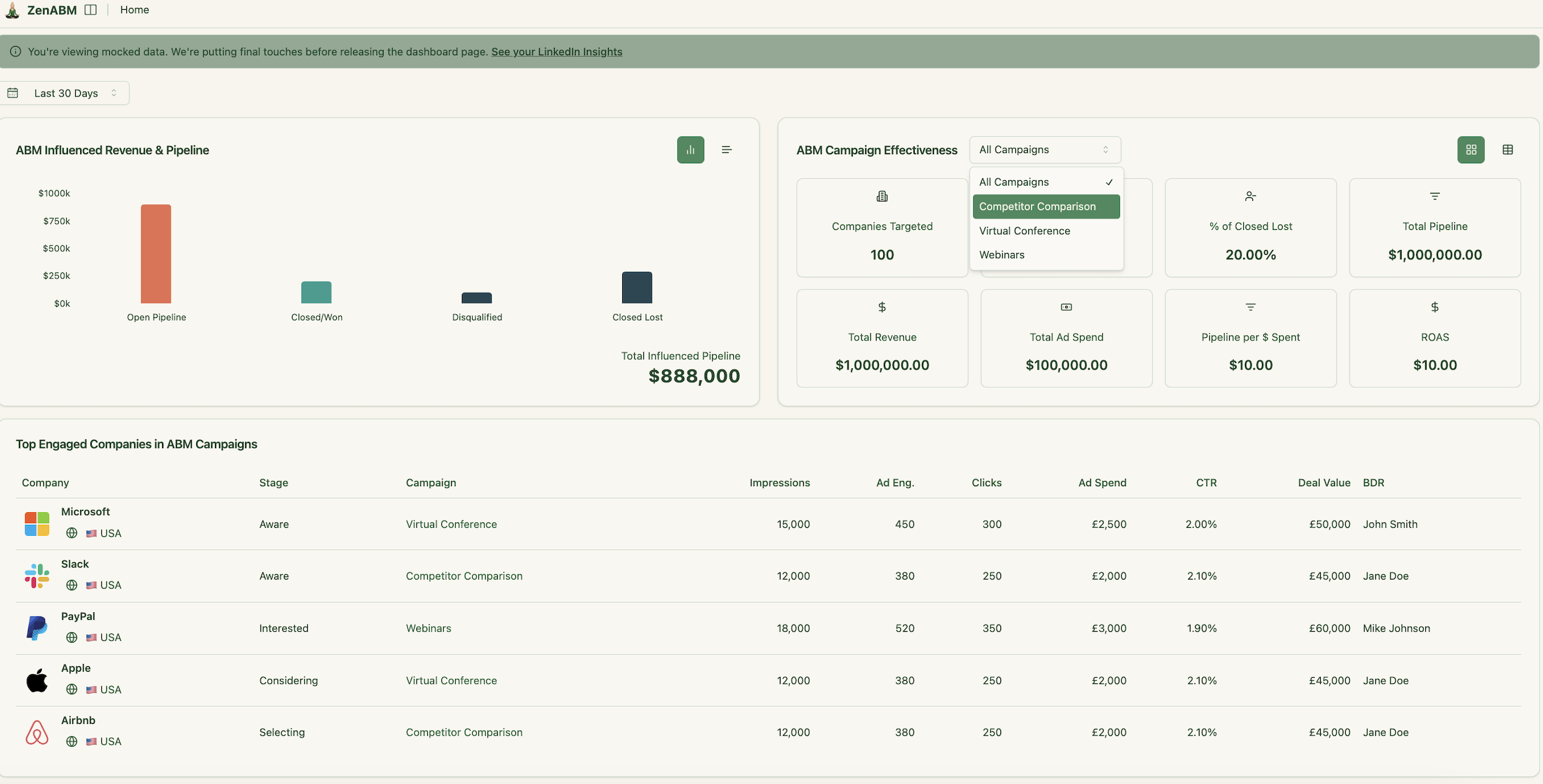

It provides you with both leading and lagging success indicators and campaign effectiveness metrics:
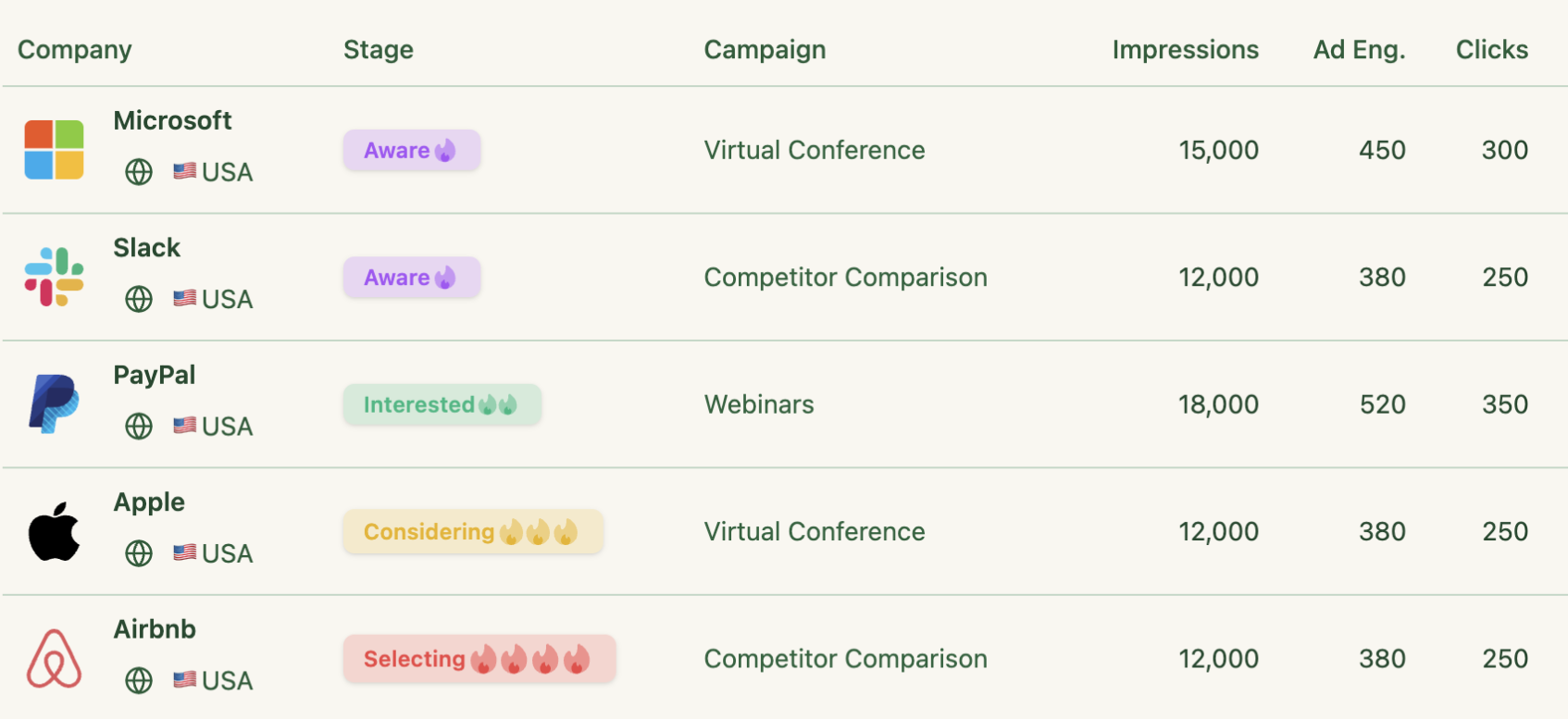
ZenABM captures company intent signals from company-level ad engagements:

As well as the stages of the funnel each company is in, as defined by you in the “ABM stages”:

ZenABM’s ABM stages are fully customizable (you can define them yourself, add or remove them) – and are based on a combination of LinkedIn Ad engagements, CRM deal or lifecycle stages, and custom properties:

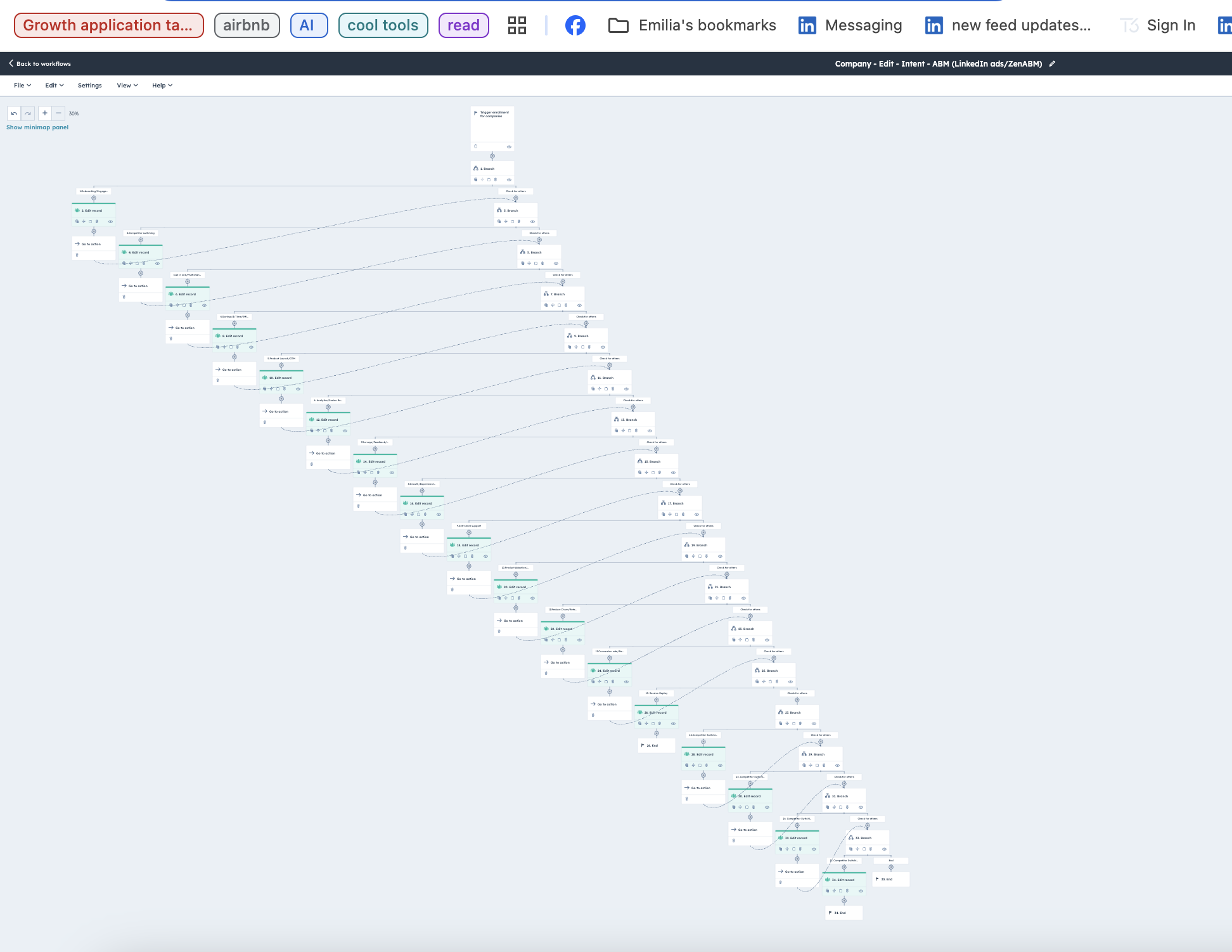
Fibbler doesn’t have any of these features. And this is the main reason why I switched to ZenABM – because using raw data from Fibbler to run ABM campaigns – create the attribution logic per campaign, and analytics dashboards in Hubspot required massive revops and very time-consuming and vulnerable workflows in Hubspot. E.g. this is a workflow for setting ABM stages based on raw impression & click data.
ZenABM gives you both the raw data (company engagements, impressions and clicks – in 7, 30 and 90 days, as well as cumulative totals) as well as the processed data – account stages in the awareness funnel and intent.
Fibbler gives you just the raw company engagement data.
Let’s see how the tools compare on those.
Fibbler and ZenABM offer similar data when it comes to company-level LinkedIn Ad engagement insights – both give you company engagements, impressions and clicks – in 7, 30 and 90 days, and push these data to your CRM (Salesforce / Hubspot or other CRM via Webhooks).
Company engagements in ZenABM:

Company engagements in Fibbler:

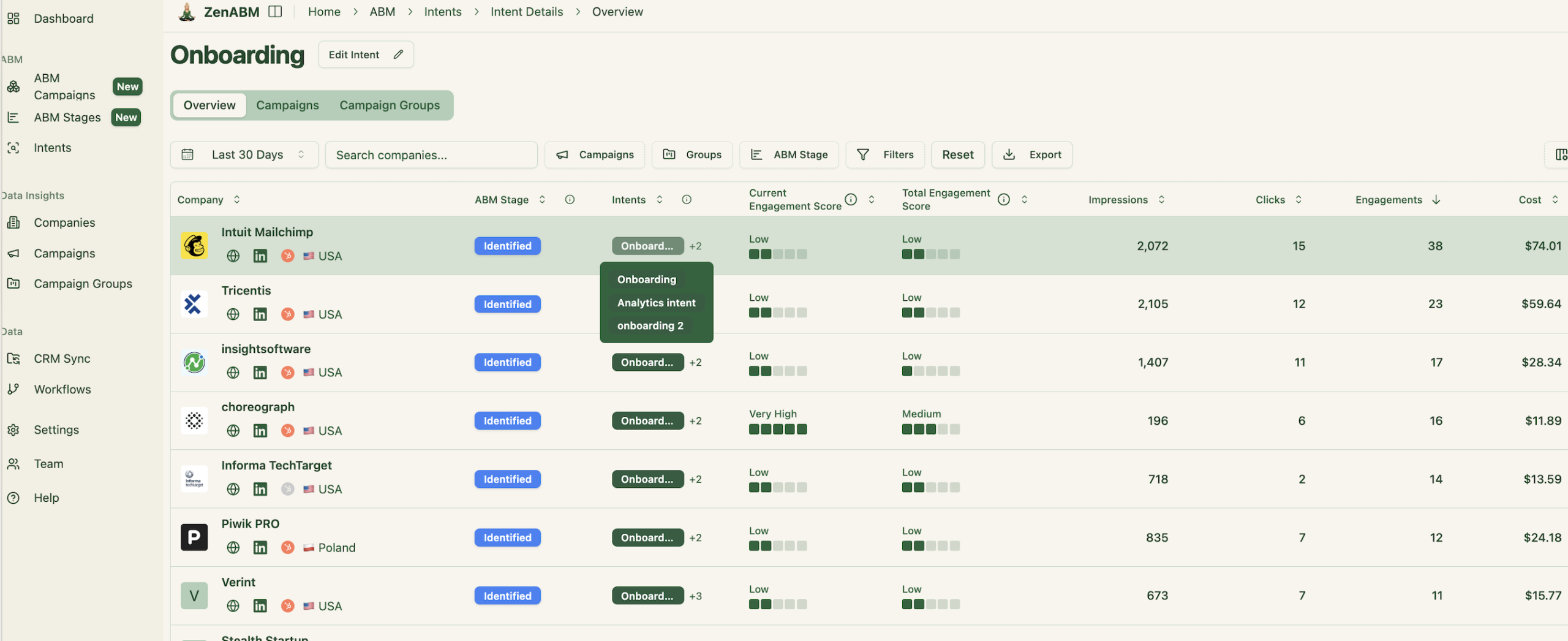
ZenABM provides detailed company page for each company with a list of campaigns the company engaged with, and timeline of touchpoints:
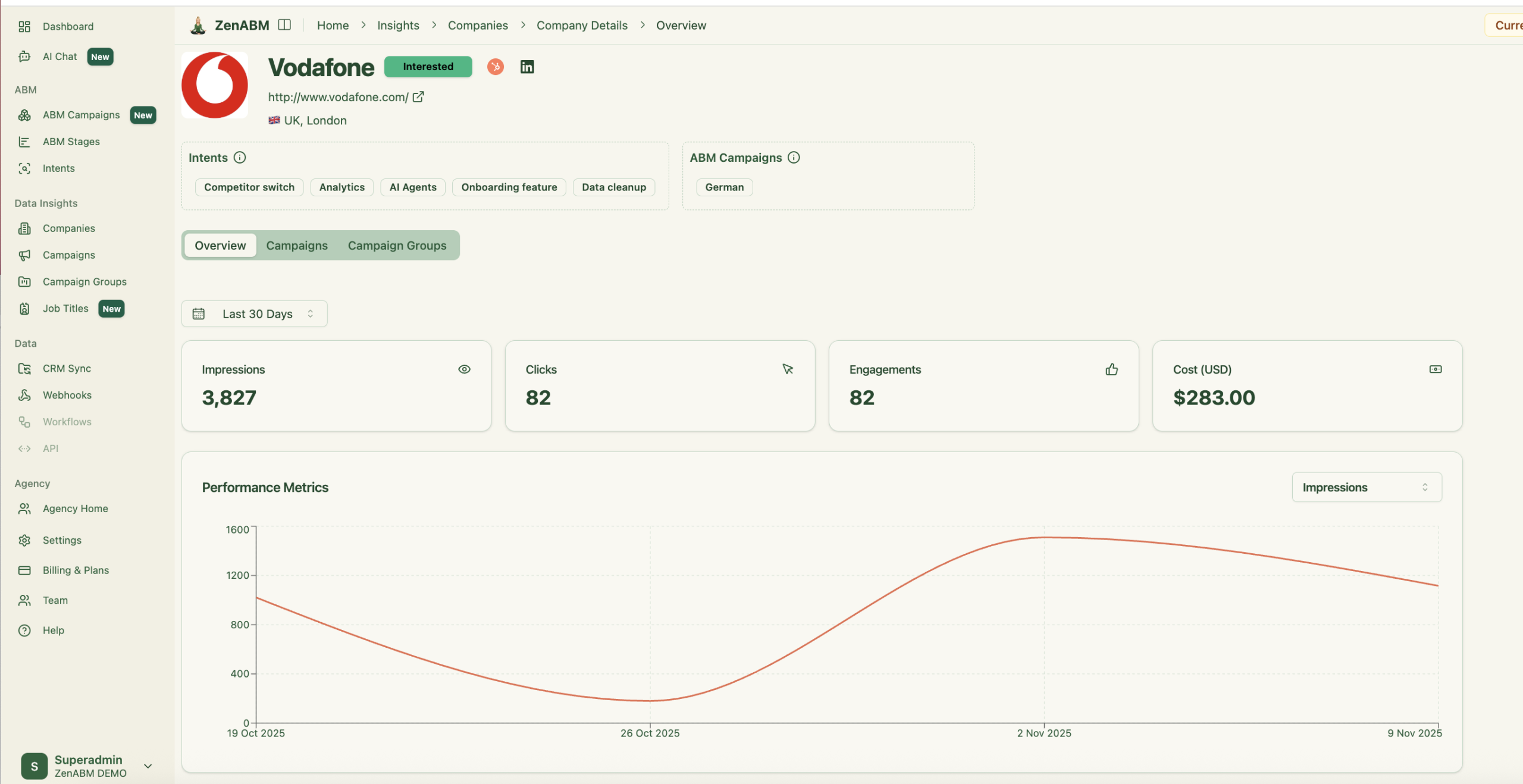
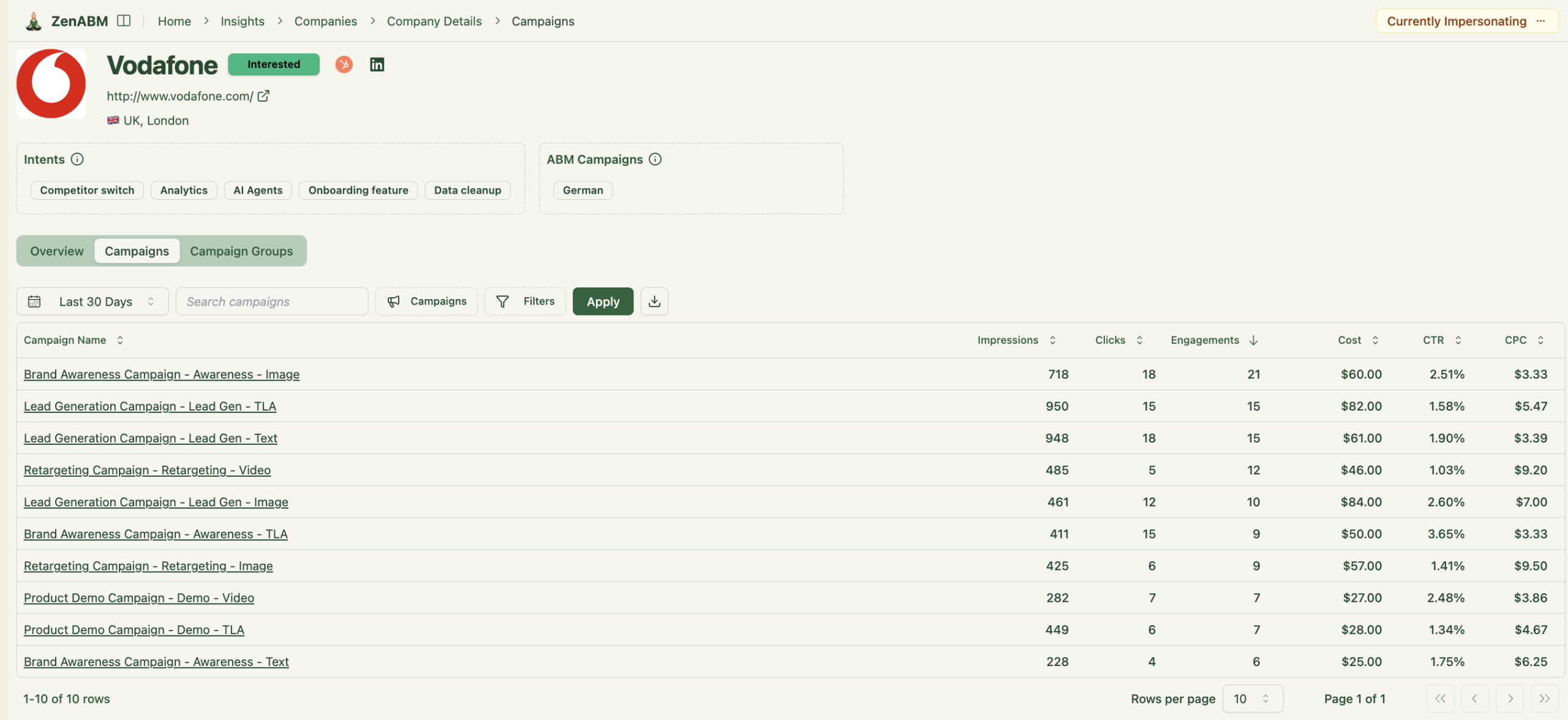
As you can see – ZenABM showcases all the data about the company (including intents, ABM campaign its in) on its page. The data is searchable and exportable.
Fibbler doesn’t have dedicated company-level pages. It opens the campaign engagements in a dialogue window – which you cannot search, filter or export.

Due to the technical differences between the tools, ZenABM displays the data much faster. See how the two tools compare in terms of company-level ad engagement data:
| Fibbler Loading Speed (when changing data timeframe) | ZenABM Loading Speed (when changing data timeframe) |
|---|---|
 |
 |
ZenABM pushes the Campaign Names per company as an automatically created company property – and Fibbler doesn’t:


You can use the intent data and stage directly to assign the companies to BDRs / push the associated contacts into a specific follow up email sequence.
Meanwhile – this is how Fibbler pushes the company level data into the CRM (Hubspot):

This is why you need to do all the heavy lifting with the workflows to use of that data for your ABM Campaigns.
What about campaigns? Again, both Fibbler and ZenABM provide insights on Campaign Performance.
ZenABM allows you to click on each campaign to see a list of companies that engaged with it.

Fibbler gives you total engagements per campaign, without breaking it down by company:

Note it provides you with ‘influenced deals’ on each campaign level – the tool itself has a disclaimer ‘Note: Deals can appear in multiple campaigns. Use this to spot trends, not to sum totals.’ Since the same deals are attributed to multiple campaigns, it’s hard to see what’s really going on.
Meanwhile – in ZenABM you can group several LinkedIn campaigns into one ABM campaign – and track total influenced pipeline from all the assets in these campaigns. This is particularly helpful when you want to compare how targetting different audiences/ different personas/ different markets/ different messaging – affects pipeline generation, and which campaigns you should double down on.

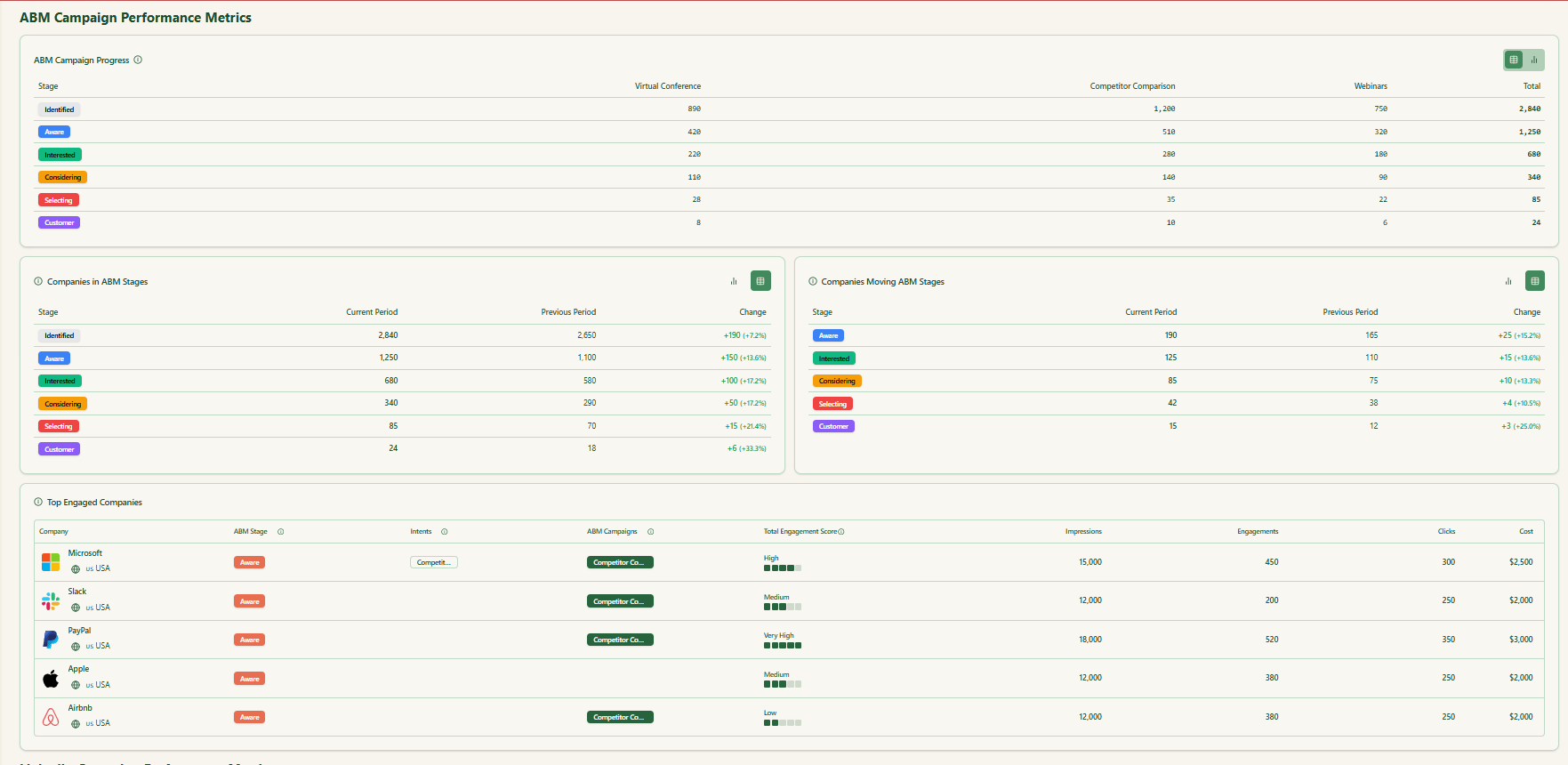
ZenABM was built for strategic ABM performance tracking, while Fibbler is designed for LinkedIn ad analytics and optimization.
In ZenABM, analytics are centered around ABM campaign objects — meaning you can group multiple LinkedIn campaigns into one ABM initiative and measure funnel performance, account progression, and pipeline attribution per campaign. ZenABM’s dashboards go far beyond impressions and clicks: they show pipeline per $ spent, account movement across ABM stages (identified → aware → selecting → won), and ROI by campaign or market segment.

The data is processed and stored in-app, giving instant load times, custom time-period comparisons (e.g., this quarter vs. last), and deduplicated revenue attribution (so the same deal isn’t counted twice across multiple campaigns).


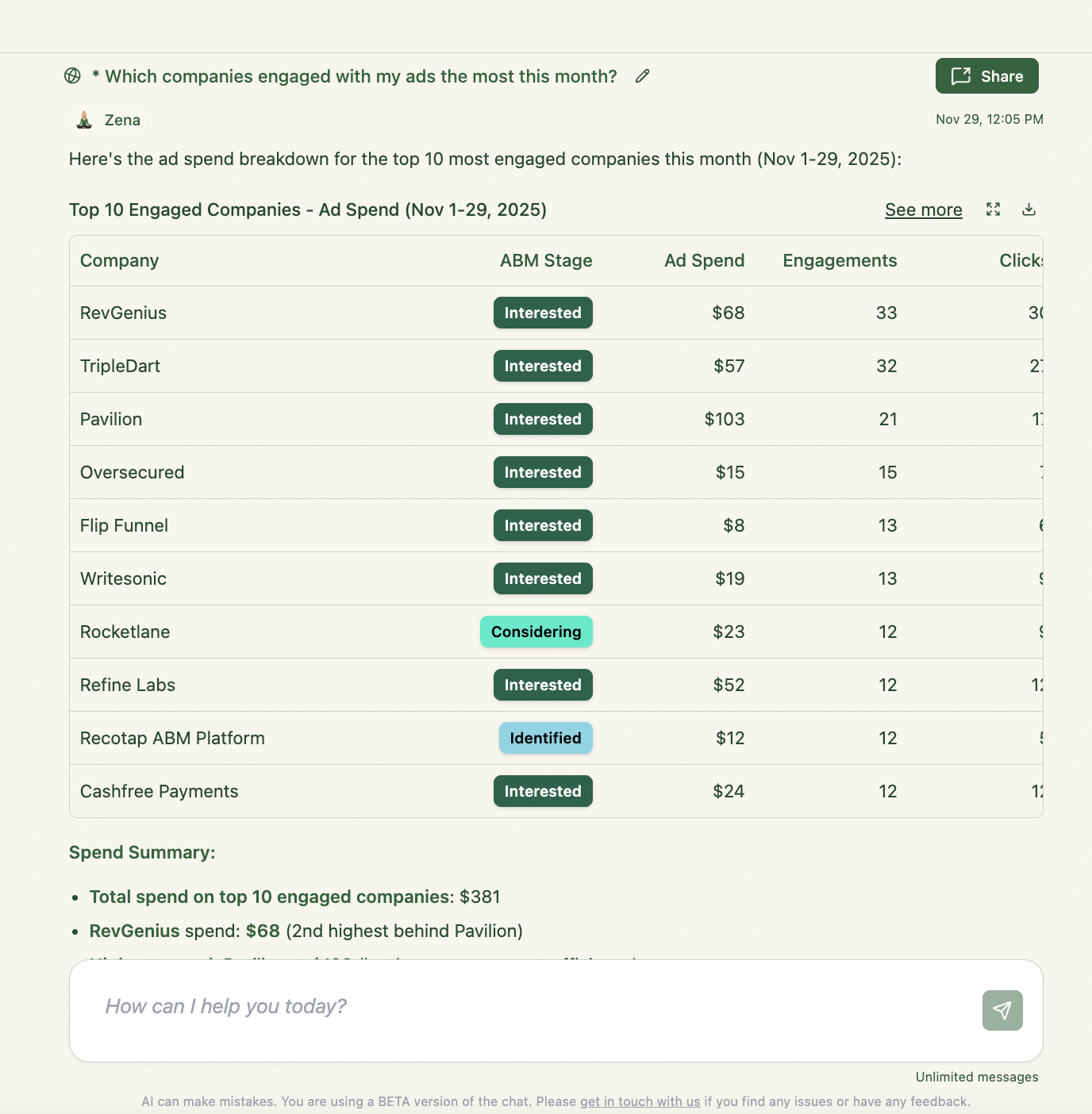
Also – ZenABM’s AI chatbot also lets you query your data conversationally and uncover insights without manual filtering:
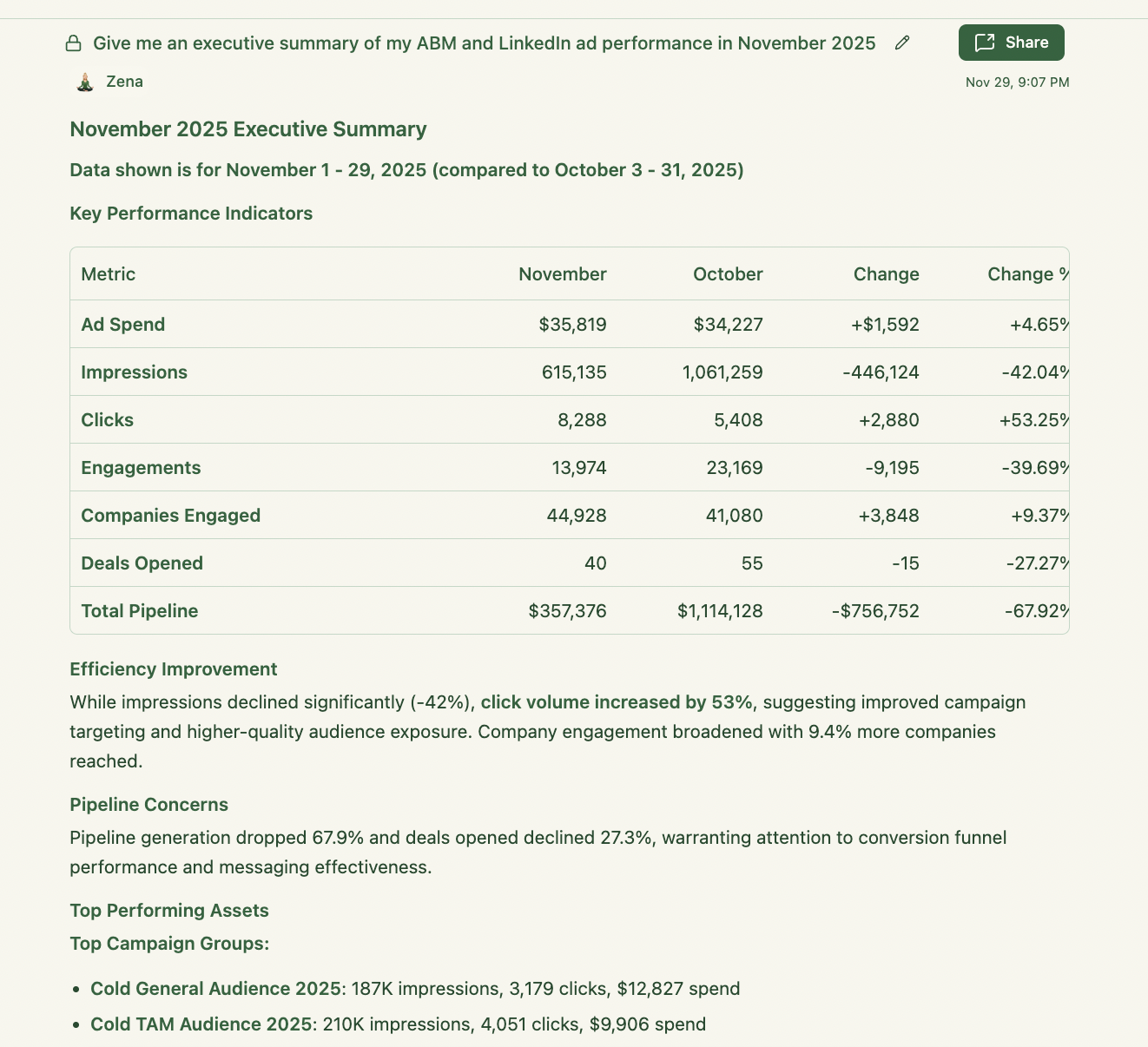
Fibbler, on the other hand, focuses on ad engagement and revenue data – impressions, clicks, and deals influenced by campaign. It lacks ABM segmentation, intent scoring, and de-duplication, which can lead to inflated or unclear ROI metrics when deals appear across several campaigns. Its dashboards show total engagements and influenced revenue, but not pipeline per campaign or funnel stage movement.
Fibbler provides only limited “ROI reporting” which is based on the timeframes you’ve selected for your entire ad campaign. ZenABM breaks the reporting up by the specific ABM campaigns you’re running. It also gives the all-time analytics for all your LinkedIn Ads in the main dashboard.

Also – ZenABM allows you to report on more metrics:
Let’s see how the analytics in the two tools compare:
In short:
ZenABM = full-funnel ABM analytics + AI insights + clean revenue attribution.
Fibbler = raw ad performance + basic ROI view for media optimization.
This is probably the most significant differences.
ZenABM integrates an MCP server and an AI chatbot that allows you to query your LinkedIn ad and ABM data in natural language — asking questions like “Which accounts moved from Interested to Selecting this quarter?” or “What’s my pipeline per $ spent across campaigns?” Its AI layer pulls from both raw LinkedIn engagement data and ZenABM’s processed insights (intent, account scoring, funnel stages), giving you on-demand, context-aware answers & recommendations. ZenABM gives you useful starter prompts and then follow up prompts for each query:

This makes it far more interactive and actionable for marketers to understand how their Linkedin ad ABM programs are performing. If you’re still copying and pasting your LinkedIn ad performance data – try ZenABM with AI chatbot and chat to your LinkedIn ads for free!

Fibbler, on the other hand, currently has no AI functionality or MCP infrastructure. It focuses purely on extracting and displaying raw engagement and revenue data from LinkedIn Ads, leaving any interpretation, analysis, or workflow automation to be built manually inside your CRM or BI stack. In short: ZenABM turns your ABM data into a conversation — Fibbler just hands you the spreadsheet.
Both Fibbler and ZenABM offer very affordable pricing – so it won’t be an issue or a consideration.
Fibbler begins at around US $89/month for its Growth tier (with higher tiers around US $129/month) and focuses on LinkedIn ad attribution and CRM-linked insights for smaller teams.
ZenABM offers a FREE plan – ZenABM’s FREE plan gives you company-level LinkedIn ad engagement insights, and pushes the company-level engagement data as custom properties in your CRM. But to get access to ZenABM’s analytics dashboards, webhooks or the AI campabilities a starts at around US $59/month for its Starter tier and scales up to around US $149/month for a Pro tier, offering account scoring, LinkedIn company intent insights, and full ABM dashboard.
| ZenABM Pricing | Fibbler Pricing |
|---|---|
 |
 |
Both Fibbler and ZenABM offer free trials – of 30 and 37 days respectively. ZenABM offers a FREE plan and a “reverse trial” on the FREE plan – you get access to all ZenABM’s features in the 37 day free trial, and then get downgraded to a free plan unless you upgrade.
Both Fibbler and ZenABM offer insights into Audience engagement (job titles etc.) and account journeys:
ZenABM offers more granular insights into each job title’s engagement – a breakdown by campaigns and campaign groups, video views per job title


Fibbler doesn’t offer video views insights, nor a timeline of the engagements by job title.

Let’s see the differences between these two tools in terms of features that don’t overlap:


At the point of writing Fibbler offers impression capping, campaign scheduling and job title exclusions. ZenABM does not offer these features at the moment (which is why some companies choose to use both!) but impression capping is coming to ZenABM soon (in January 2026). Impression capping is also something that can be done natively with LinkedIn Campaign Manager’s audiences.
The technological differences between Fibbler vs ZenABM lead to how much data each tool is able to display to you.
LinkedIn API obfuscates data that are fewer than 3 clicks or that came from fewer than 3 members in any specific timeframe:

Now, the practical implications for this is that if you query LinkedIn API in real time for short timeframes – you get very little data. This is what happens when you ask Fibbler for 7 day data.
ZenABM fetches your 7 day date range out of its own database, where it stores your data for the longest permissible time period.
Again – in sum: Fibbler is LinkedIn ads optimization/attribution tool. ZenABM is a tool for running ABM campaigns on LinkedIn, using the de-anonymized company engagement data for account scoring etc.
Let’s look at the quick summary of main differences between Fibbler and ZenABM: functionality (LinkedIn ads vs. account scoring) – especially for ABM, technological, performance, data quality and scope, and of course – pricing and integrations.
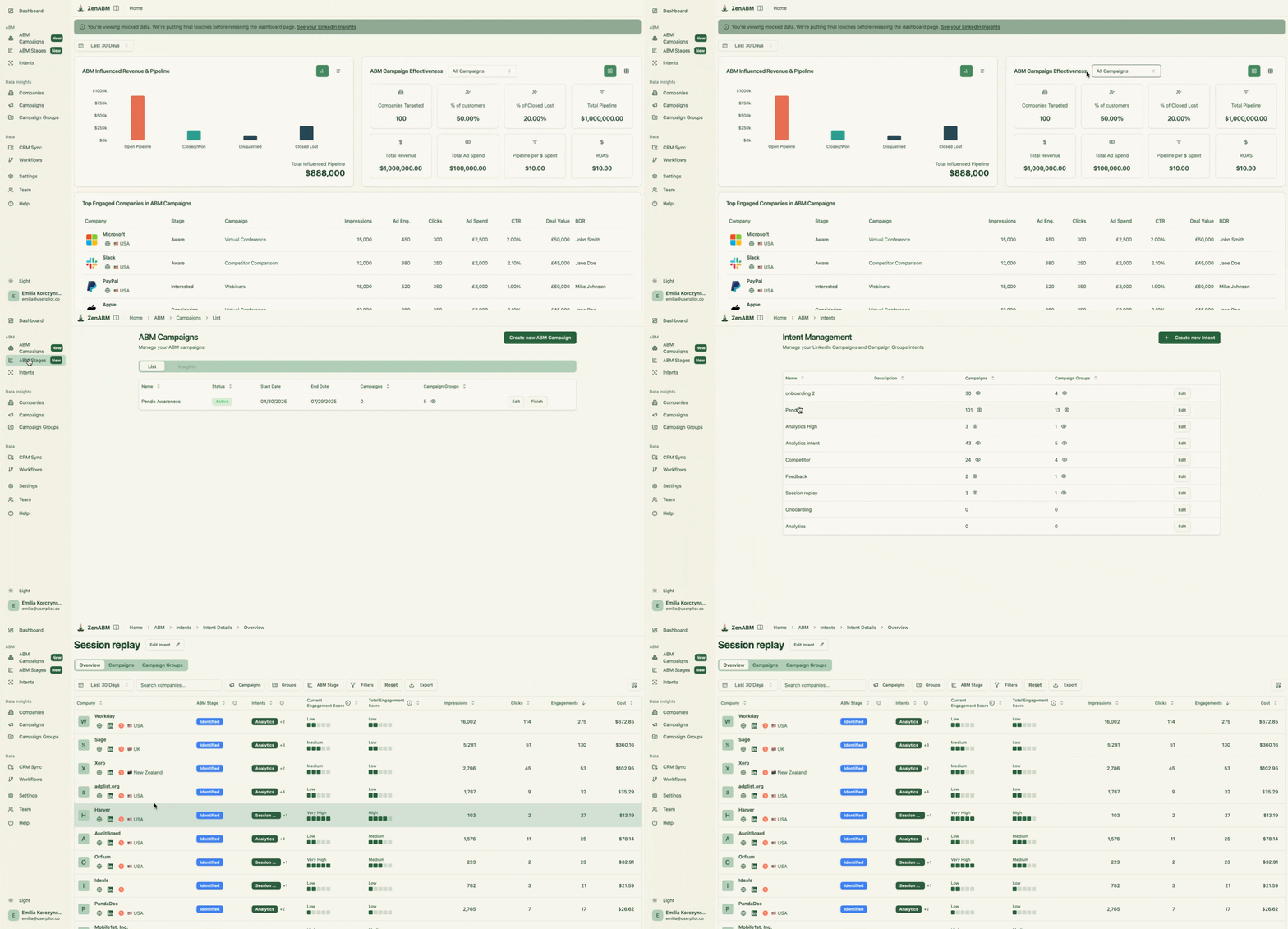 This includes:
 In Fibbler, you only see Total Ad Spend, Total “Influenced pipeline” and “Total influenced revenue” – without any breakdown by ABM campaign. As a result – you can’t really compare the effectiveness of your different ABM campaigns -only each of your LinkedIn campaigns one by one – because Fibbler does not provide an “ABM Campaign” object. This was really annoying for me when using Fibbler, as I then had to build all these custom dashboards on Hubspot.
Hope this post helped you understand the differences between Fibbler and ZenABM and evaluate which tool is better for your needs. Since both tools offer free trials – the best way to really learn what works best for you is to sign up for each and find out!