


In this guide, I have compared DemandSense vs. Dreamdata on features, pricing and ABM fit so your marketing and sales teams can quickly see which platform aligns with their ABM motion.
I have also discussed how ZenABM can work as a lean LinkedIn-first alternative or serve as a complementary layer due to its unique features.


In case you want it short:
| Category | DemandSense | Dreamdata |
|---|---|---|
| Platform Type | LinkedIn-centric ABM and demand gen platform | B2B activation and attribution platform |
| Main Focus | LinkedIn ad optimization and engagement-based intent | Multi-touch attribution and revenue analytics |
| Intent Model | LinkedIn engagement and IP-based visitor ID | CRM, web, and ad touchpoint aggregation |
| Data Scope | LinkedIn and limited multi-channel visibility | Cross-channel, CRM-to-revenue data unification |
| Integrations | HubSpot, Salesforce, Meta, Display, CTV | 40+ integrations across CRM, MAP, and ads |
| Pricing | $99–$149/month (plus intent credits) | Free tier; paid from ~$750/month |
| Best Fit | LinkedIn-heavy ABM teams and agencies | Data-driven teams seeking full revenue attribution |
A third option: ZenABM gives account-level LinkedIn ad engagement, pipeline dashboards, account scoring, ABM stages, CRM sync, first-party qualitative intent, automated BDR assignment, custom webhooks, an AI chatbot Zena that gives deep LinkedIn ABM analytics in natural language, and job title analytics starting at $59 per month.
DemandSense presents itself as a LinkedIn-centric account-based marketing and demand gen platform for B2B marketers and agencies.
It combines LinkedIn ad optimization, intent data, and prospecting so you can unmask visitors, capture buying intent, and adjust budgets, schedules, and targeting.
DemandSense blends several capabilities into one growth platform.

DemandSense aims to unmask anonymous website visitors and identify companies showing buying interest.
Its Visitor ID or IntentID uses LinkedIn data and site tracking scripts to match ad clicks and visits back to firms, then pushes that data into audiences and your CRM.
A G2 user says they can see which companies visit before forms are filled and use that as a clear engagement signal.

Note: Website visitor deanonymization still leans on IP matching and cookies, which are fragile. Remote work, private networks, unregistered IPs, and ageing databases hurt accuracy. Cookies are also being phased out. A Syft study puts IP-based identification at about 42 percent accuracy.
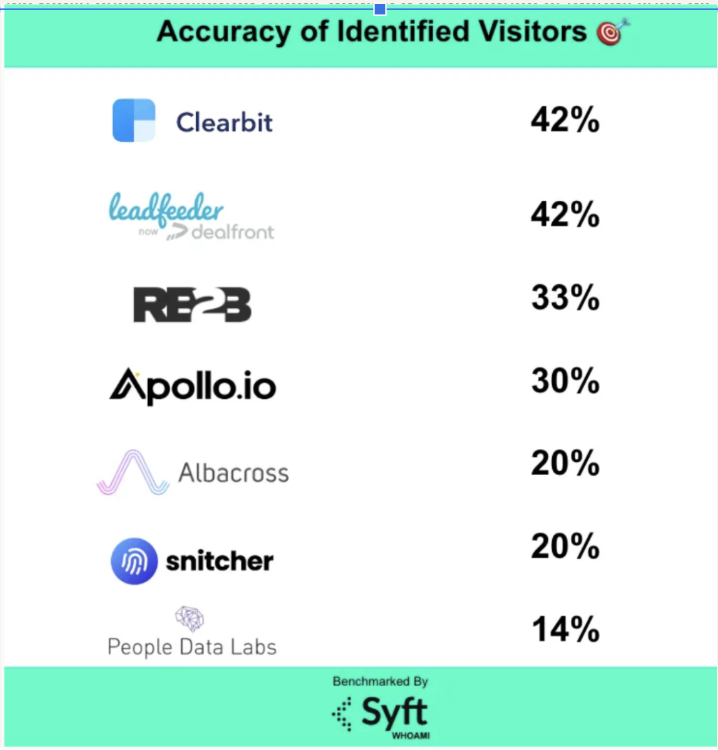
So, instead of relying on IP trackers, you can use ZenABM – it lists out all the companies that have viewed, engaged with, or clicked your ads.
Best part?
All this data is pulled from LinkedIn’s official ads API.


Once signals are in, you can group accounts by intent and engagement and build firmographic or behavioral audiences.
DemandSense supports custom lists for LinkedIn retargeting (and other channels), lets you exclude weak segments, and caps impressions per account so large accounts do not get spammed.
DemandSense sits on top of Campaign Manager to provide stronger ad controls without heavy complexity.
It auto-tunes LinkedIn campaigns with features like:


LinkedIn remains the core channel, but DemandSense can extend to Facebook and display or CTV networks by reusing the same account lists as custom audiences.
The idea is a connected journey: someone clicks a LinkedIn ad, visits your site, and later sees a follow-up elsewhere, all tracked inside DemandSense.

DemandSense is not only about ads. It tries to tie everything back to revenue.
It pushes engagement into your CRM and syncs with HubSpot and Salesforce so company records show LinkedIn impressions, clicks, and scores.
This gives sales signals such as “Acme viewed your pricing page after a LinkedIn click” and lets you attribute ad spend to the pipeline.

ZenABM likewise pushes account scores and engagement into CRM company records as properties, starting at $59 per month.


DemandSense breaks down ad engagement, spend, and performance by hour:

DemandSense pricing reflects how deeply you want intent baked into LinkedIn and cross-channel GTM.
The Basic plan at $99 per month gives marketers and sales a self-serve entry.
It includes audience tuning so users can see which companies interact with LinkedIn ads, plus ad scheduling, frequency capping, and richer reporting.
For companies that want intent data flowing directly from their website into sales, DemandSense Plus starts at $149 per month.
It adds everything in Basic plus 250 monthly data credits to identify anonymous website visitors or uncover leads from target accounts and unlocks the Website Visitor ID module.
Together, the tiers position DemandSense as an accessible LinkedIn intent tool with room to scale, provided you are comfortable with the credit model.
The $99 and $149 plans look attractive until you notice the Plus tier’s 250 credit cap. Any decent traffic or outbound research can burn through that fast, and overages are where the real costs sit, turning a friendly sticker price into a classic intent data upsell.
ZenABM often comes out smarter, starting at about $59 per month for Starter, with the highest agency tier (unlimited, no credits) still under $6K per year.
You get what you actually need for LinkedIn ABM: account-level engagement tracking, account scoring, ABM stage tracking, automatic routing of hot accounts to BDRs, bi-directional CRM sync, custom webhooks, qualitative buyer intent, job title level engagement, and plug-and-play ROI dashboards.
ZenABM also gives you unlimited website visitor identification if you retarget site visitors with cheap LinkedIn text ads and read back which companies were served impressions.
You get deanonymization and awareness in one go.
Public reviews for DemandSense are still sparse.
On G2, DemandSense currently has a single 5-star review from an agency user.

The reviewer praises the LinkedIn integration and ROI but warns that “there is a lot in the platform” and that you need time and possibly vendor help to set it up well.
Dreamdata bills itself as a B2B “Activation and Attribution Platform” that maps buyer touchpoints and ties them to revenue.
Dreamdata aims to be a central place to connect marketing spend to revenue.

Dreamdata provides several attribution models, such as first touch, last touch, W-shaped, time decay, and data-driven options. It aggregates CRM, website, and ad data into a single timeline so you can see how content and campaigns contributed to a deal, not just the last click.


Dreamdata rolls data into revenue analytics dashboards, showing pipeline and ROI by channel, campaign, and content. You can track metrics like Time to Revenue and pipeline velocity by stage. Some users on G2 note that not all pre-built reports are useful, and the learning curve is real.

By the way, ZenABM also provides account-based LinkedIn ad revenue attribution dashboards starting at $59/month.


Dreamdata automatically organizes contact-level touchpoints into account journeys so you see how buying committees move from first touch to close. Its ABM view helps marketing show influence on deals and track account-level engagement.

The “Reveal” module identifies which companies are engaging most, scores their activity, and flags high fit visitors.

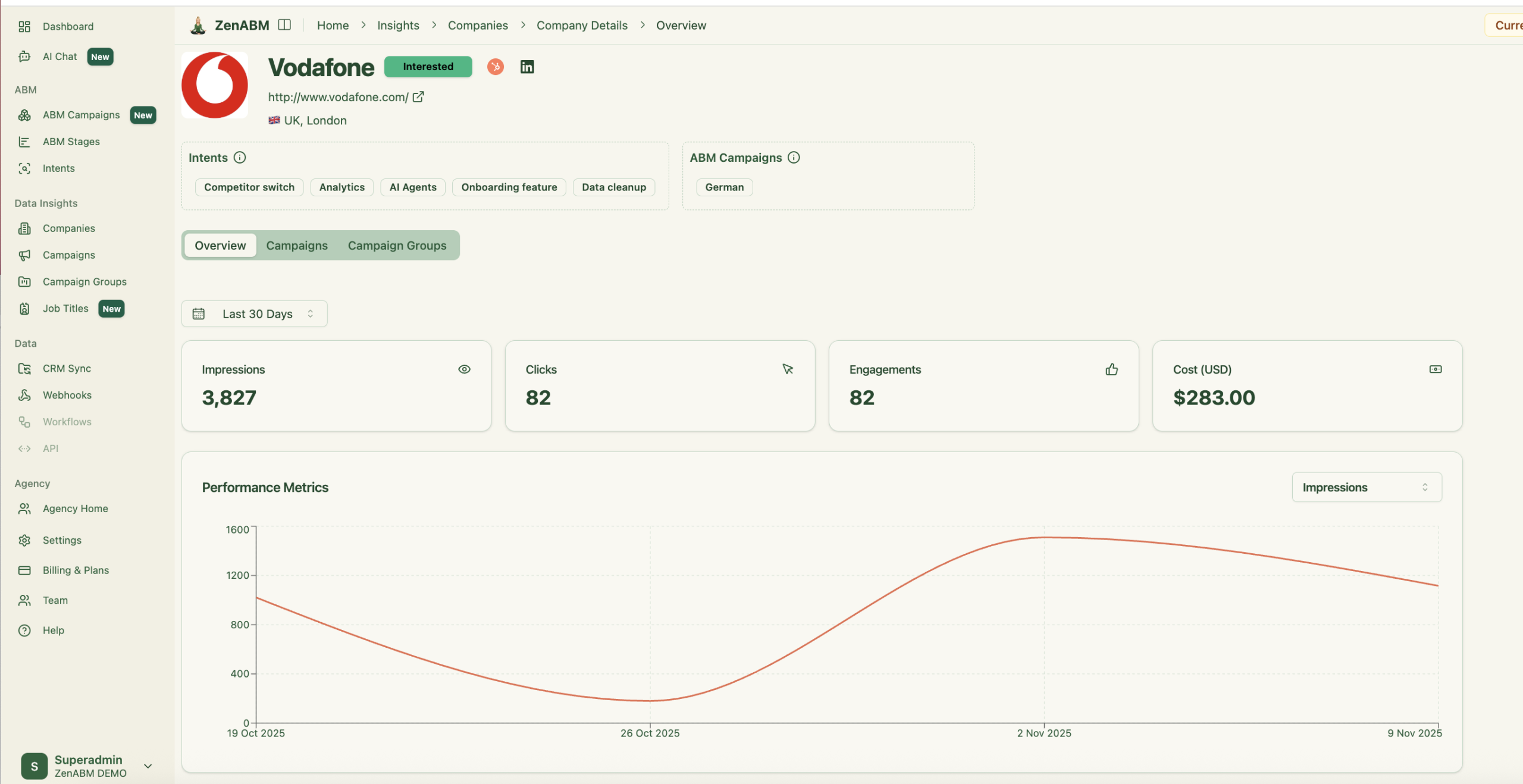
ZenABM also provides journey visualizations showing the impact of LinkedIn ads on a deal progression.
Dreamdata lets you build audiences using filters across all your data and sync them to ad platforms. For example, you can create a segment of accounts that visited your pricing page twice and retarget them on LinkedIn.

It also supports one-click conversion syncing, so events like SQLs or closed deals flow back into ad platforms for revenue-based optimization.

Dreamdata has 40+ integrations across CRMs, marketing automation, ads, analytics, and more.
Big ones:
Dreamdata pricing isn’t clear on the site.
Here is what is publicly available:

If you are looking for a leaner tool, ZenABM starts at $59/month. It offers account-level LinkedIn ad engagement tracking, plug-and-play dashboards, account scoring, ABM stage tracking, CRM sync, first-party qualitative intent, automated BDR assignment, custom webhooks, and job title-level engagement tracking.

Dreamdata reviews cluster around three themes:
DemandSense vs. Dreamdata differences are summarized here.
| Aspect | DemandSense | Dreamdata | Takeaway |
|---|---|---|---|
| Core Function | LinkedIn ad control, intent data, and CRM sync | Attribution, revenue mapping, and journey analytics | DemandSense focuses on execution, Dreamdata on analysis |
| Intent Source | Engagement-based, IP and ad data | Touchpoint-based across CRM and ads | Dreamdata’s signals are richer but require setup |
| Ease of Use | Simple for LinkedIn-first teams | Requires ops involvement and clean data | DemandSense wins on usability |
| Attribution | Basic engagement to pipeline link | Advanced multi-touch with W, linear, and time decay models | Dreamdata is built for attribution-heavy reporting |
| Integrations | HubSpot, Salesforce, Meta | Full-funnel ecosystem (CRM, MAP, G2, Slack, etc.) | Dreamdata wins in integration depth |
| Pricing Model | Affordable SaaS, credits for intent | Premium, enterprise-level | ZenABM beats both on value |
After we have discussed DemandSense vs. Dreamdata for ABM, let’s visit the third option: ZenABM.
ZenABM is built for teams that rely on LinkedIn as the primary ABM channel and want first-party accuracy, automation, and revenue visibility without the price or complexity of multi-channel suites.
Let’s look at its core features:
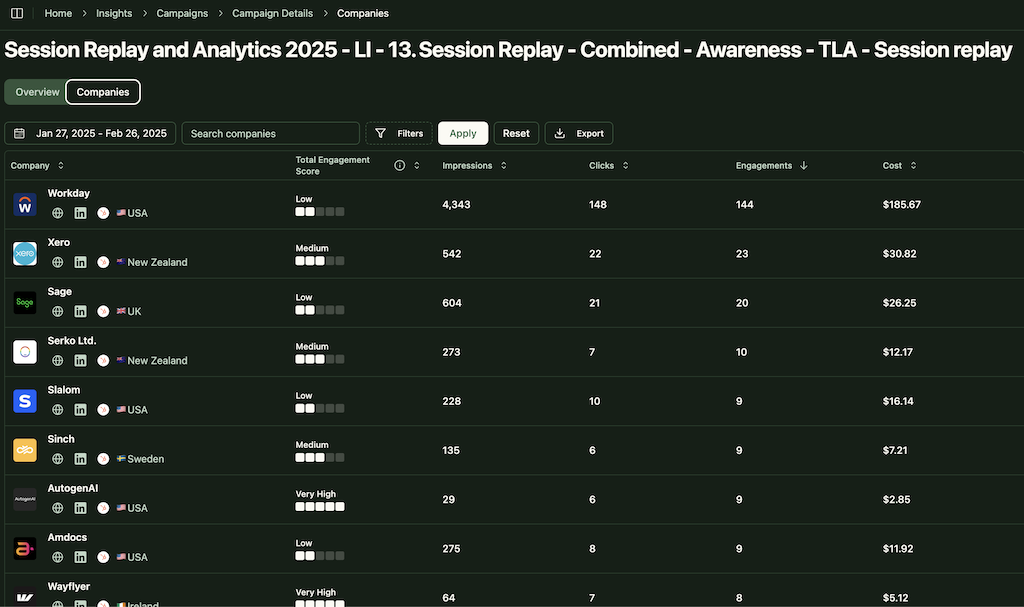
ZenABM connects to the official LinkedIn Ads API and captures account-level data for all campaigns so you can see which companies see, click, and engage with your ads.
Because this is first-party data from LinkedIn’s environment, it is more reliable than IP or cookie-based visitor ID.
A Syft study puts IP-based identification at around 42 percent accuracy.
ZenABM treats LinkedIn ad engagement itself as first-party intent. When several people in one company keep engaging with your ads, that is a strong buying signal without rented intent feeds.
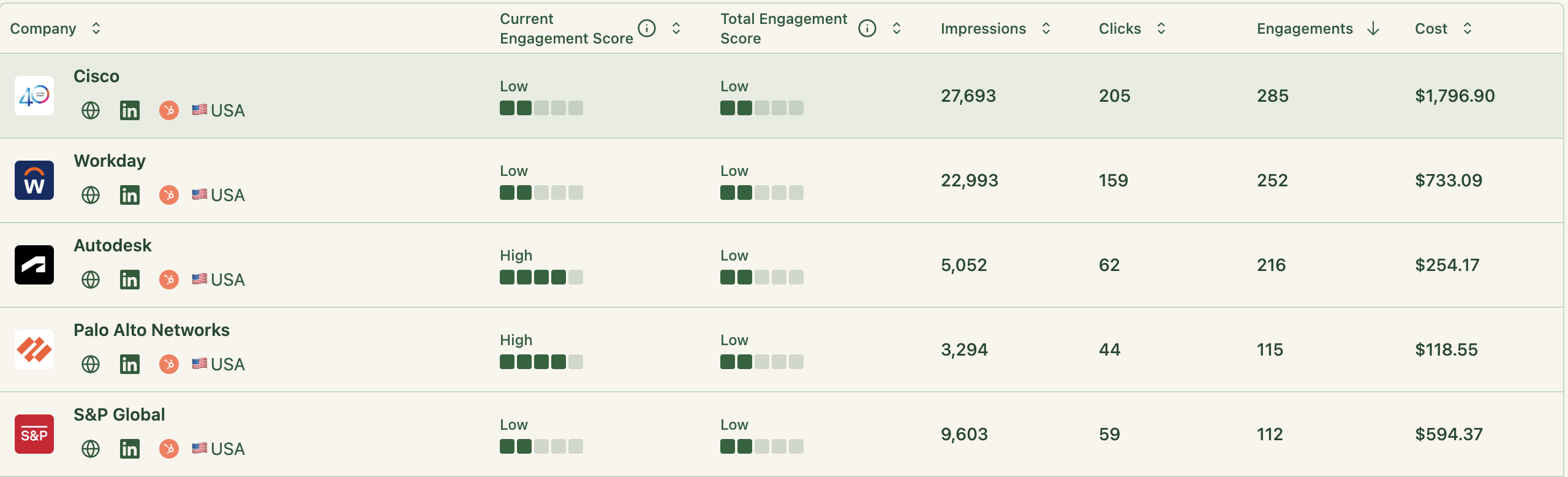
ZenABM updates engagement scores as accounts interact with your ads across campaigns, so you can see who is heating up over short or long windows and let marketing and sales prioritize accounts that show real intent.
ZenABM also shows the full touchpoint timeline for each company:
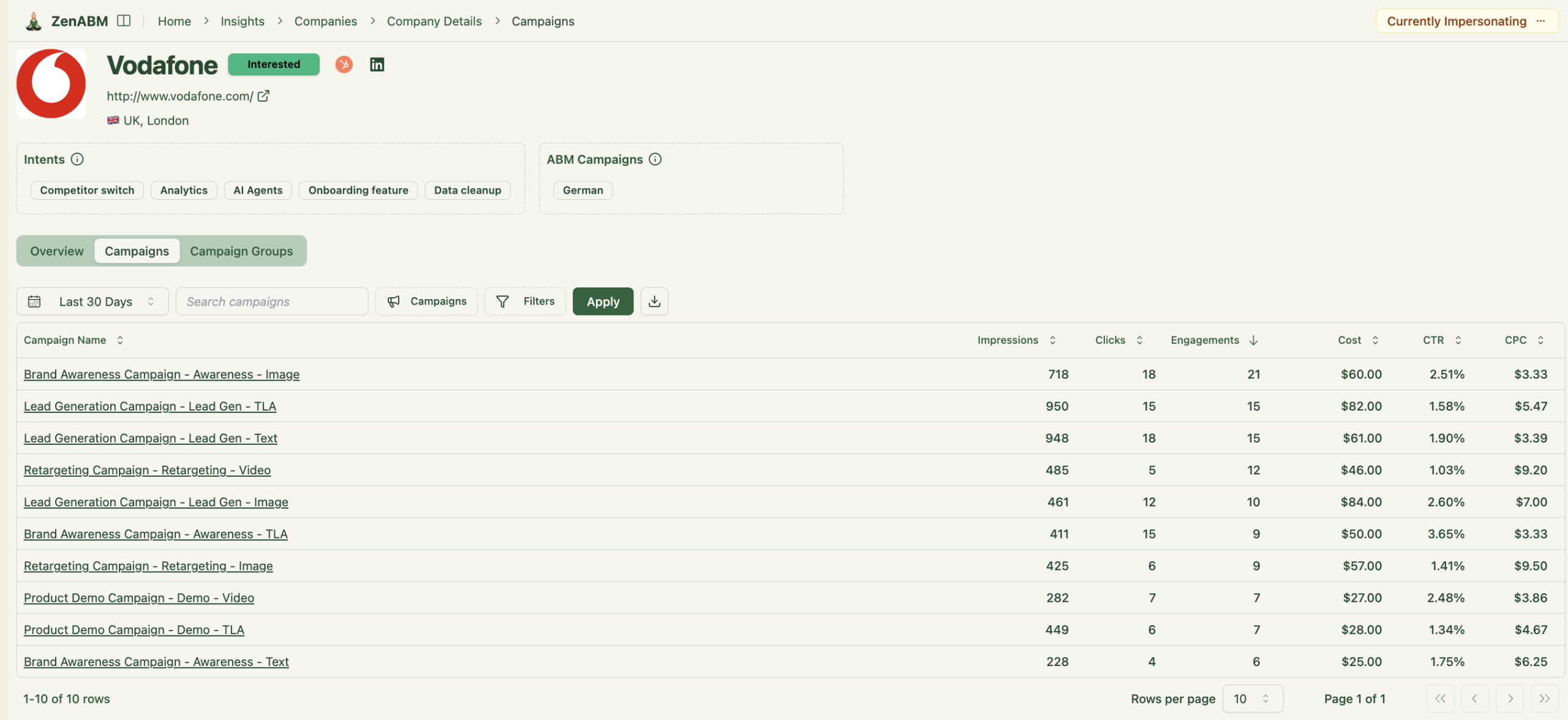
ZenABM lets you define stages such as Identified, Aware, Engaged, Interested, and Opportunity and automatically places accounts in the right stage using scores and CRM data.
You control thresholds, and ZenABM tracks movement over time.

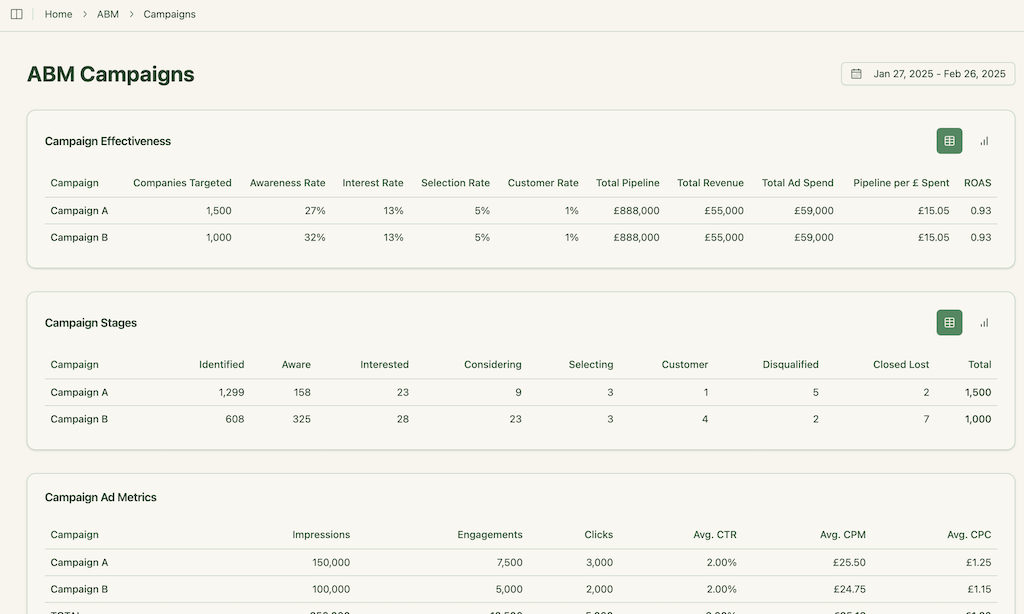
This gives you funnel visibility similar to larger suites, but powered by LinkedIn data.
ZenABM integrates bi-directionally with CRMs like HubSpot and adds Salesforce sync on higher tiers.
LinkedIn engagement data flows into the CRM as company-level properties:
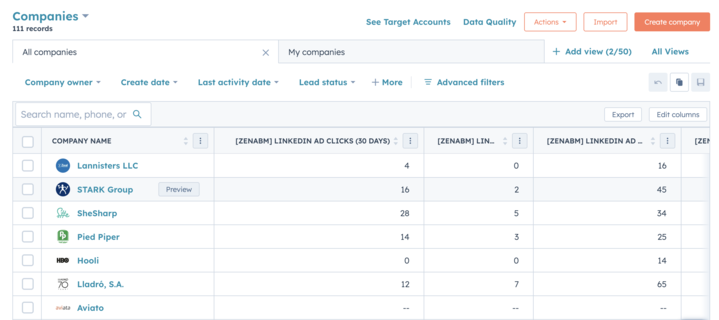
Once an account crosses your score threshold, ZenABM updates the stage to Interested and automatically assigns a BDR.
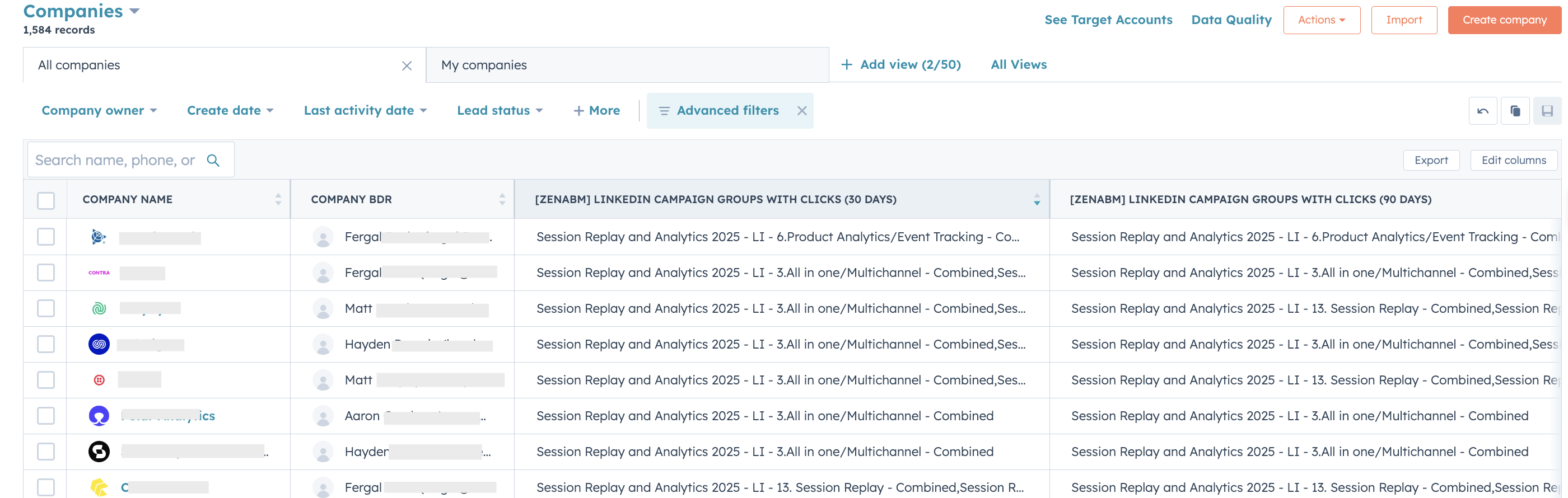
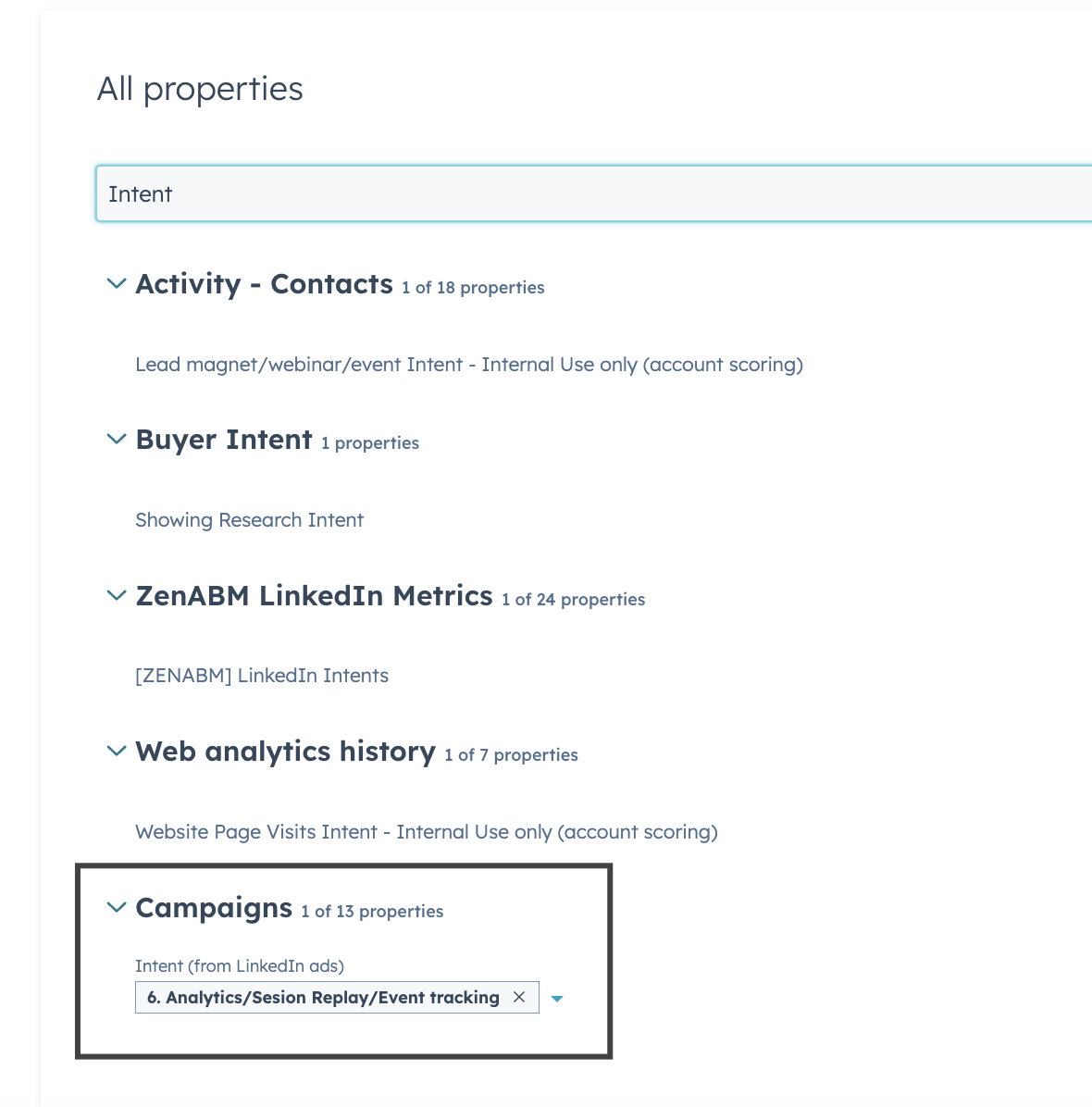
ZenABM lets you derive intent topics from LinkedIn campaigns by tagging campaigns by feature, use case, or offer.
ZenABM then shows which accounts engage with which themes.
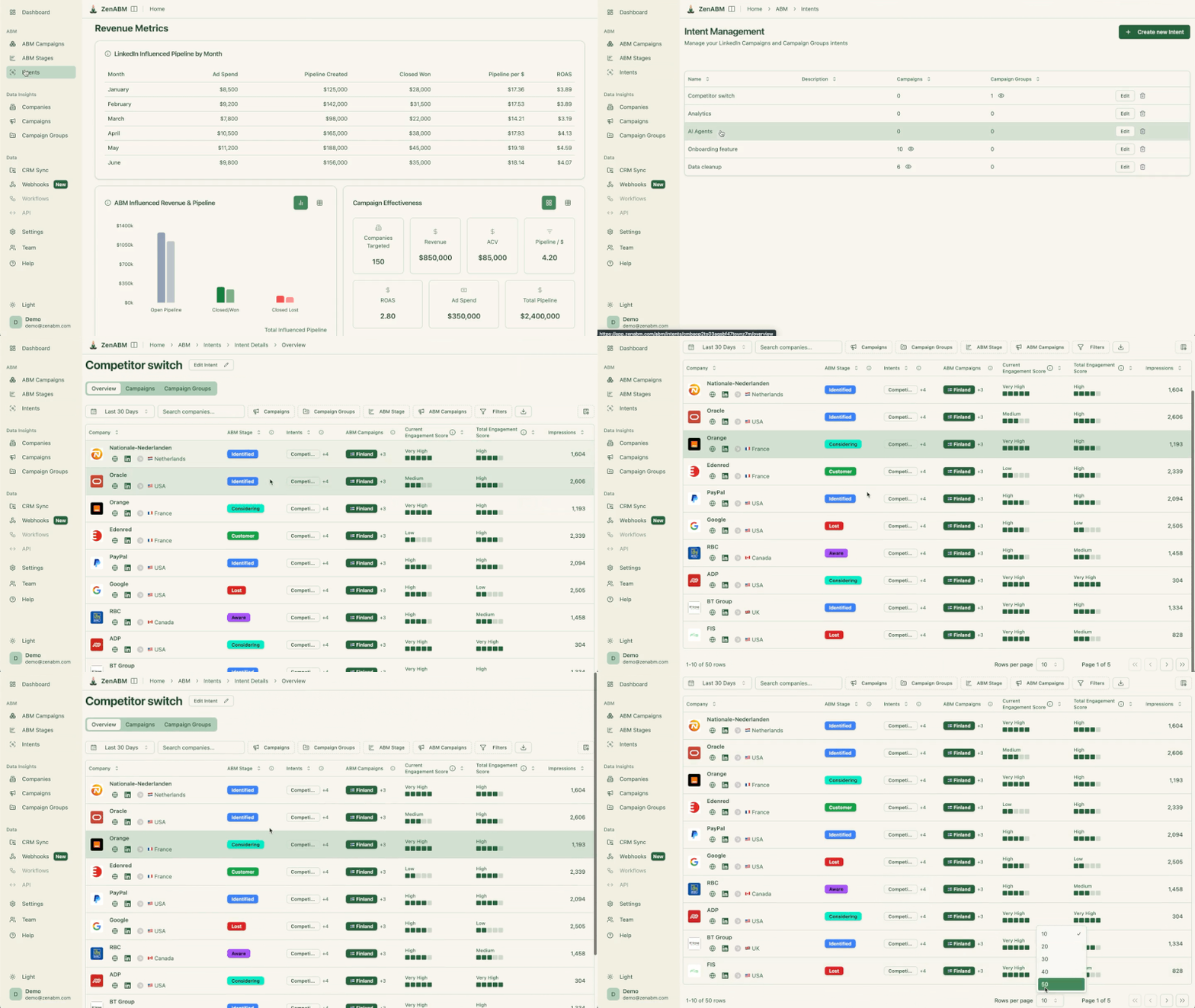
This is clean, first-party intent from owned interactions.
You can push these topics into your CRM, so sales and marketing can tailor outreach to what each company has actually explored.
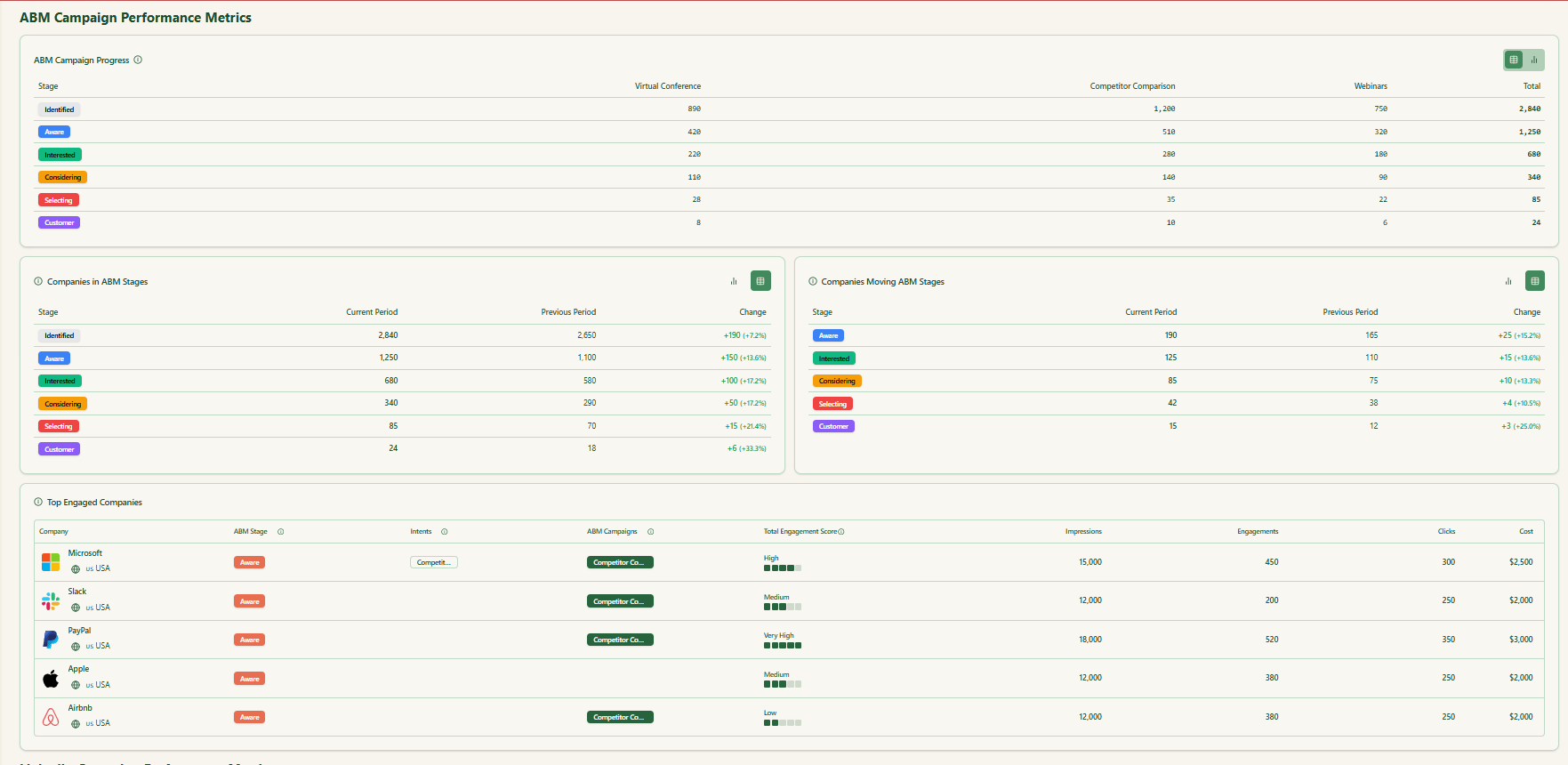
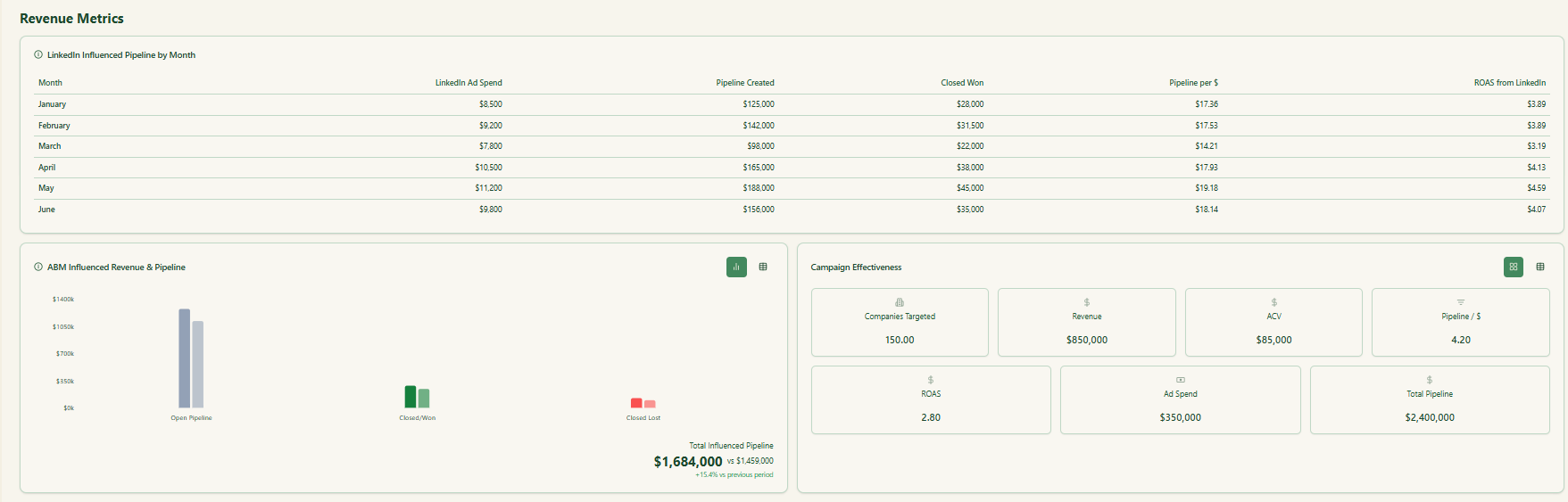
ZenABM ships with dashboards that connect LinkedIn ads to account engagement, stage movement, and revenue.
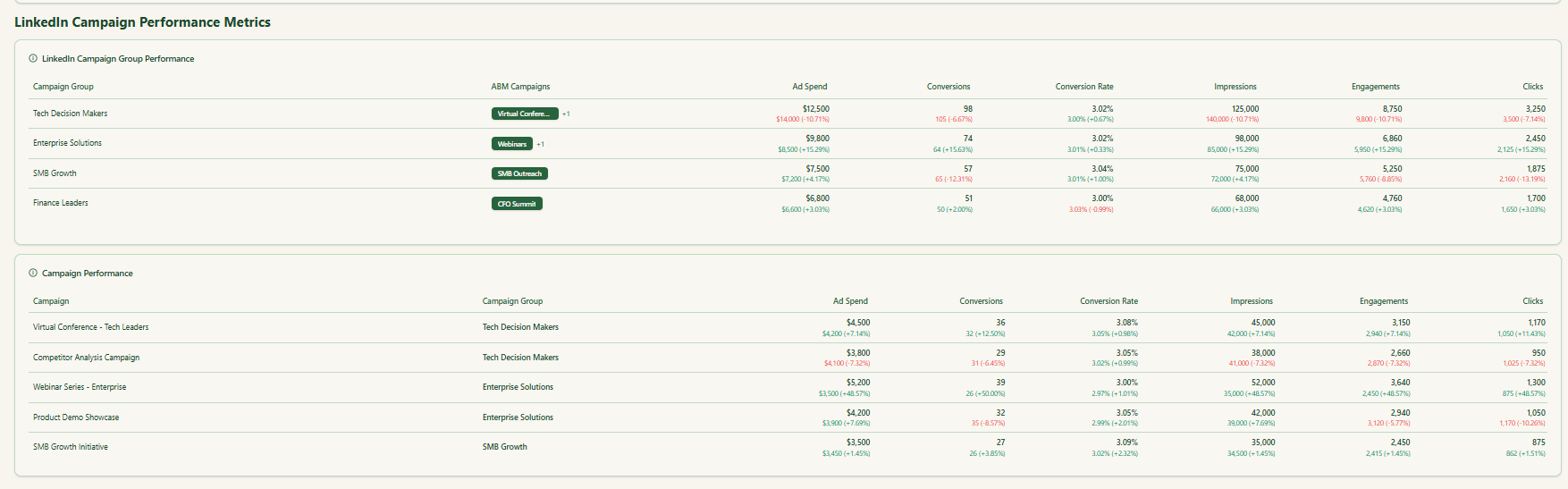
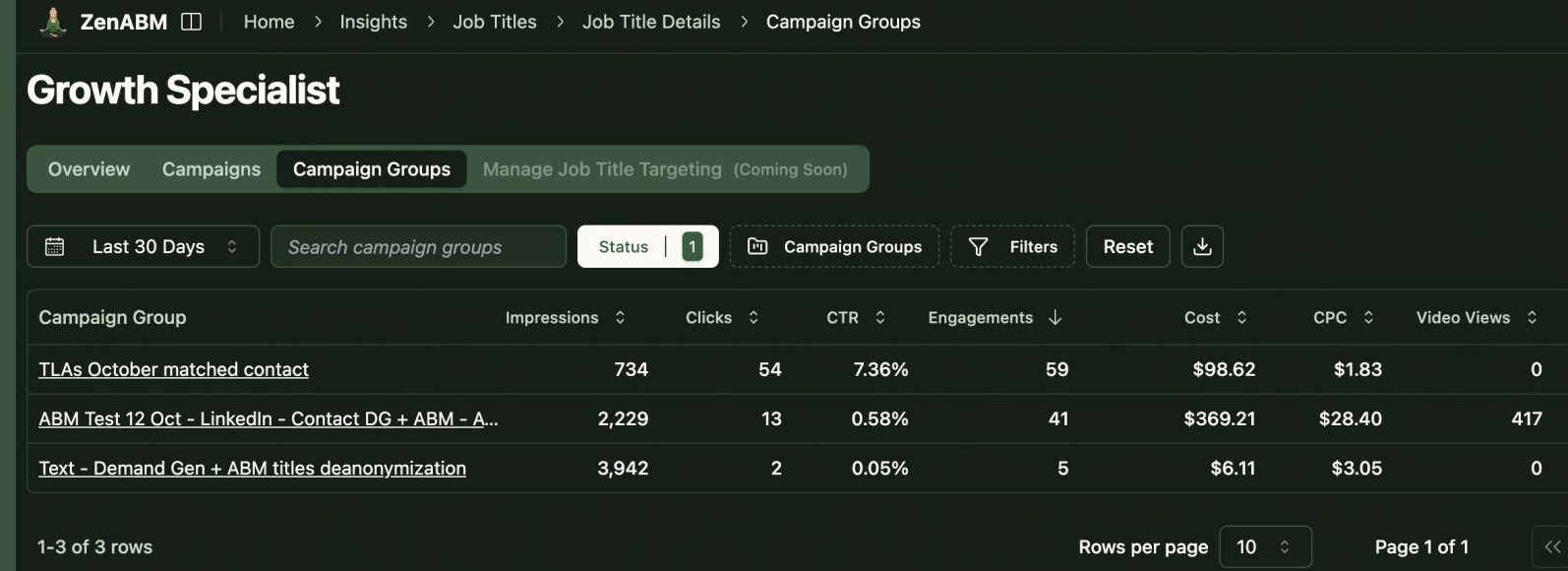
ZenABM shows which job titles engage with your creatives and gives dwell time and video funnel analytics.
ZenABM provides its AI chatbot called Zena that basically answers all you want from ZenABM in natural language.
You can ask Zena open-ended questions like you would a smart analyst and get company-level answers about:
Under the hood, Zena combines OpenAI with a library of carefully designed prompts and endpoints to join ad engagement, spend and CRM deals so it can explain which campaigns drove pipeline, which accounts turned into opportunities, which formats perform best and which companies are high intent but untouched by sales.
Instead of exporting spreadsheets and stitching pivot tables, you get plain language insights, ready to drop into strategy reviews, weekly sales standups or executive updates.
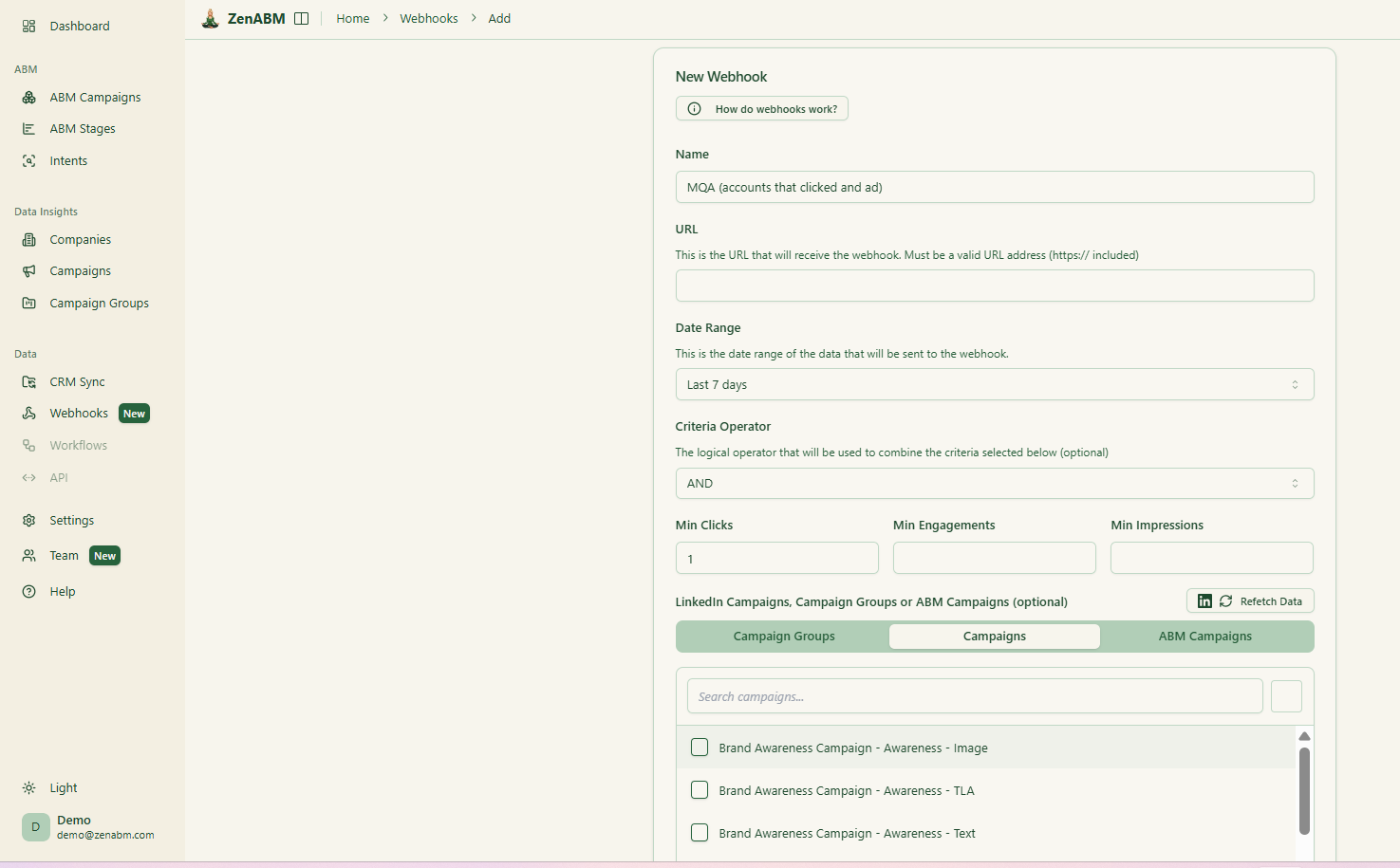
ZenABM’s custom webhooks let you push events into your stack, for example, Slack alerts, enrichment flows, or other ops automations.

Most tools treat each LinkedIn campaign separately. ZenABM lets you group several into one ABM campaign object so you can see performance across regions, personas, or creative clusters.
Instead of juggling fragmented reports in Campaign Manager, you see spend, pipeline, account movement, and ROAS for the entire initiative.
For agencies, ZenABM offers a multi-client workspace.
You can manage multiple ad accounts and clients in one environment, each with its own ABM strategy, dashboards, and reporting, instead of constantly switching accounts in Campaign Manager.
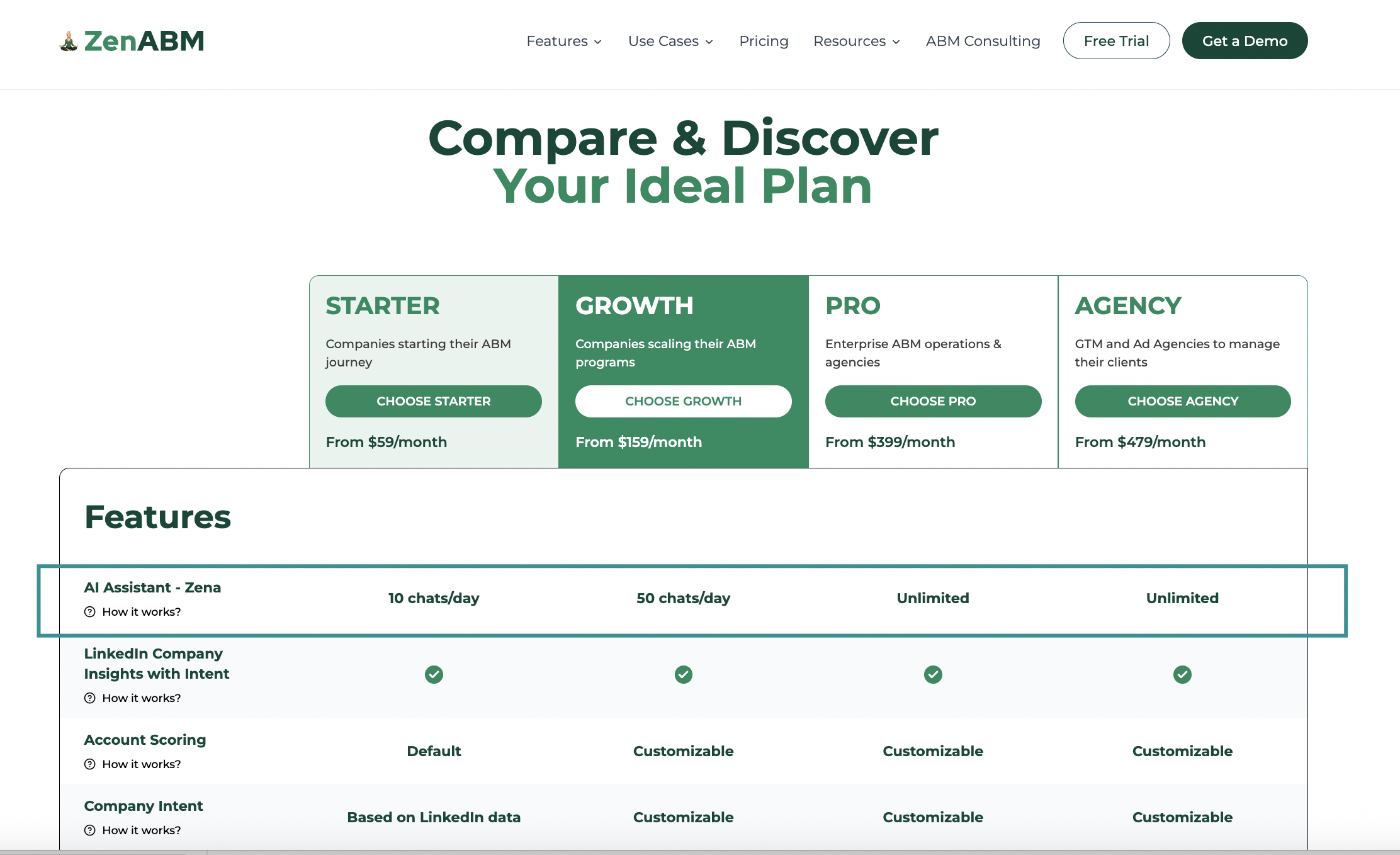
Plans start at $59 per month for Starter, $159 for Growth, $399 for Pro (with AI), and $479 for Agency.
Even the agency plan stays under $6,000 per year.
All tiers include core LinkedIn ABM features. Higher tiers mostly increase limits and add Salesforce sync.
Plans are available monthly or annually, and every plan includes a 37-day free trial.
Choose DemandSense if you want a lightweight, practical tool to fine-tune LinkedIn ad campaigns, control budgets, and get simple account-level insights without going through weeks of onboarding. It fits smaller or mid-market ABM teams that mainly care about optimizing ad spend and visibility.
Choose Dreamdata if your challenge is attribution, not activation. It connects every touchpoint to revenue, showing how content, ads, and channels contribute to deals. It’s perfect for teams with strong ops support that want to justify every dollar with data.
But both have gaps.
If your ABM motion revolves around LinkedIn, ZenABM is the simpler, sharper third option.
ZenABM runs on first-party LinkedIn data pulled straight from the official Ads API and turns that into clear, account-level insights.
No cookies, no IP guessing, no intent credits.
Here’s what you get:
It works as both a full alternative or a complementary layer to DemandSense or Dreamdata.
